
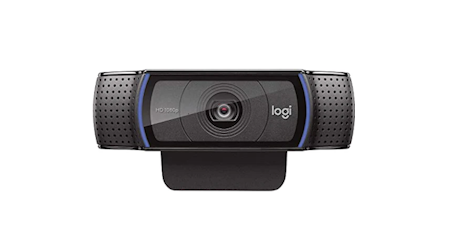
Why the Logitech C920e Webcam is a Game-Changer for Professional and Home Use
By Karar Haider BangashIn today’s world full of screens, webcams are part of daily life - not only for work chats but streaming or recording stuff too. Since fuzzy pictures and shaky audio can annoy anyone, a good webcam makes talking online way easier. If you want one that won’t fail on you, Logitech webcams usually stand out - built strong, shoots sharp, gets going fast. Check the C920e - it handles both serious meetings and laid-back videos without breaking a sweat.
This thing checks out why the C920e cam feels different - picks apart its guts, shows where it nails it, yet throws in everyday ways people use it, also sneaks in hacks to push its limits.
The Evolution of Webcams
Webcams aren't what they used to be - back then, fuzzy VGA shots were normal just for basic chats. Those old models gave grainy footage because their power was weak from the start. But bit by bit, better tech rolled in: crisp HD visuals popped up alongside clearer sound pickup. On top of that, handy tools such as auto-focus kicked in even when light got tricky.
Fueled by more people working from home, studying online, or watching streamed content, the need for good webcams has jumped sharply. People want gear that offers sharp video, solid sound, plus works smoothly no matter what app they use. Logi - known for dependable gadgets - keeps answering this call with a wide lineup of cams built to perform.
Why Logitech Webcams Are Trusted
Logitech’s known for making solid webcams that just work. These gadgets focus on what users actually need. What sets them apart? Built-in mics team up with crisp video quality. Autofocus keeps your face sharp even if you move around. Some models pack privacy shutters - sliding covers block the lens when idle. Lighting adjustments happen automatically, so you’re never lost in shadows. Mounts fit most screens without extra tools. No bloatware slows things down during setup.
- HD video: Lots of Logitech cams offer 1080p Full HD or better - crisp, clean images every time.
- Crisp sound quality: mics inside use noise filtering to pick up clean audio - perfect when you're on calls, going live, or making videos.
- Simple to run: Lots of devices work straight outta the box, so no tricky setups needed.
- Versatility: Logitech cams work on Windows or Mac, plus they hook up smoothly with Zoom, Teams, Google Meet - also OBS Studio.
These features mean Logitech webcams work well for teachers, streamers, office workers, or anyone just hopping on a call now and then.
Introducing the Logitech C920e Webcam
The Logitech C920e cam stands out among its peers in the brand's collection. Packed with solid specs yet priced low, it fits many different uses well - thanks to smart design choices behind the scenes.
Design and Build Quality
The C920e has a slim, small shape - perfect for slipping onto laptops, desks, or screen edges. Built tough, it lasts longer while the flexible clamp holds tight on different setups. Tilt it how you want; lining up your shot feels smooth and natural.
Video Performance
The c920e Webcam grabs attention with sharp 1080p video running at 30 fps - so your streams, meetings, or clips stay clear and fluid. It adjusts focus on its own while fine-tuning brightness automatically, which means you still look good when the room’s dim. That kind of help really matters if you're working from home or making videos without studio lights.
Audio Capabilities
The C920e comes with two built-in mics that pick up crisp sound, yet keep ambient noise low. That’s crucial when you're doing virtual meetings, giving lessons online, or making videos - since being understood matters most.
Compatibility and Ease of Use
The webcam runs smoothly on both Windows and Mac. Alongside Zoom, you can use it with Microsoft Teams without issues. It also hooks up fast to Google Meet or Skype - no delays. Even OBS Studio supports it right outta the box. Just link the C920e through USB and go. No fuss, no extra steps needed.
Practical Applications of the Logitech C920e Webcam
Remote Work and Online Meetings
Professionals who work from home rely on smooth video calls to stay effective - clarity helps teamwork flow better. The C920e camera keeps your image sharp and tidy, making online chats feel lively without distractions. Thanks to built-in mics that block out extra noises, your words come through clean even if things get loud nearby.
Content Creation and Streaming
Content creators who stream need a solid webcam with clear video plus good sound. The C920e works well for YouTube clips, live Twitch sessions, how-to guides, or daily vlogs. It shoots in Full HD - colors look true to life, giving off a polished vibe. Two built-in mics pick up voice naturally without extra gear.
Education and Online Learning
Teachers or pupils might gain a lot using the C920e. Sharp visuals improve online classes, helping hold attention while sharing material without hiccups. Its auto-focus keeps speakers centered, even if they shift around, so lessons feel steady and natural.
Telehealth and Virtual Consultations
Doctors doing online visits require a solid webcam so they can talk clearly with patients. The C920e delivers sharp sound and clear visuals, helping remote checkups feel smooth, even natural.
Comparing the C920e with Other Logitech Webcams
Though Logitech makes plenty of c920e Webcam hits a sweet spot - solid features, fair cost, works well. Against pricier picks like the Brio or StreamCam, it delivers sharp Full HD but skips the 4K markup. Most folks, whether working from home or office, get what they need here: auto-focus that keeps up, two built-in mics, plays nice with lots of apps.
Tips for Optimizing Webcam Performance
Good lighting helps any webcam work well. Try these tricks to get more from your C920e:
- Face the light when setting up your camera: this keeps shadows away. Sunlight’s best, though gentle LED bulbs do just fine.
- Background: Keep the background tidy and neutral for a professional appearance.
- Set up the camera even with your eyes so it feels normal. Use a stand or stack books if needed - keep it steady.
- Software tweaks: Try Logitech Capture or app options to change brightness, while tweaking contrast - also fix zoom levels. Adjust each setting one by one, using the tool you're most comfy with; tweak until it looks right.
- Stay online without hiccups: keep your speed steady so videos don't freeze mid-call or while broadcasting.
Customer Experience and Reliability
Logitech cameras work well - and people rely on them across the globe. Many say they keep running strong year after year, thanks to solid support plus handy warranty deals. Take the C920e - it holds up over time, works right outta the box, delivers steady HD footage - no fuss. That's why teachers, streamers, or office users often pick this one without second-guessing.
About Us – Pyxis Solutions
Pyxis Solutions runs out of the UK, selling tech gear online. Set up in 2020, it’s all about solid computer parts and add-ons. Instead of hype, they use real feedback from buyers. Their base in Luton ships orders fast - often by tomorrow. Reliability matters more than flashy promises here.
Pyxis Solutions sells plenty of gear - like Logitech webcams, screens, comfy tools for your desk, or smart gadgets. Focused on solid build, eco-friendly choices, along with helpful support, they make sure both offices and folks at home get gear that helps them work better, think clearer, talk easier.
Conclusion
In today’s world of home offices, virtual classes, or posting videos online, having a solid webcam matters. The Logitech C920e gives sharp 1080p visuals, crisp sound, plus works smoothly across devices - ideal for job calls or casual chats. For conferencing, live streams, even school lessons, this model keeps things smooth while offering consistent quality you can count on.
With Pyxis Solutions focused on solid tech, picking the C920e means getting something tough, reliable, while backed by a name you can count on. If better video calls are what you want, then Logitech's C920e stands out - simple, steady, ready to go.